The following is a full training video for Rave Checklists - for step-by-step written instructions, please refer to the help article links and guide added below.
To Access the article on Adding/Editing Checklists and Todo's, click here.
To Access the article on Checklist Notifications, click here.
To Access the article on Branch Settings Checklist Status Groups, click here.
To Access the article on saving to a template and loading from a template, click here.
To Access the article on the Checklist Template menu, including CSV import, click here.
Checklist permissions allow you to control what each Rave user can view and manage within project checklists and Todos.
Manage these permissions in the Manage Users section under Branch Settings.
Accessing Checklist Permissions
To update a user's checklist permissions:
- Go to your profile drop-down
- Select Branch Settings - Manage Users.
- Select the required user.
- Open their Groups & Permissions.
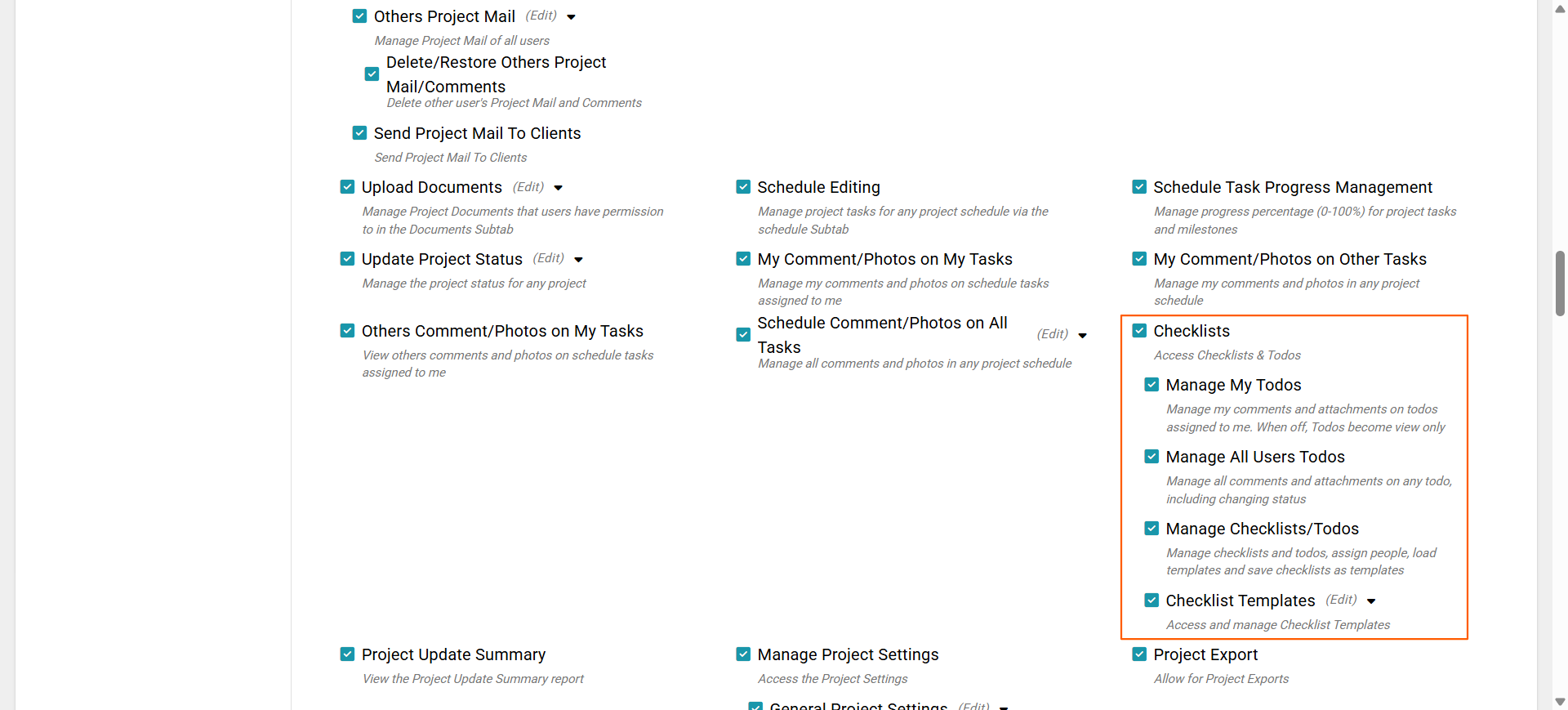
- Under Projects, locate the Checklists section.
Note: The main Checklists permission must be enabled for the user to access project Checklists and Todos.
Checklist Permission Options
Checklists
Access Checklists & ToDos
This is the main checklist permission. When enabled, the user can access the Checklists area within projects they have access to.
If this permission is disabled, the checklist permissions underneath it will not be available to the user.
Manage My ToDos
This permission allows the user to manage ToDos that have been assigned to them.
With this permission enabled, they can manage their own comments and attachments on assigned ToDos.
If it is disabled, their assigned ToDos will be view-only.
Manage All Users ToDos
This gives the user broader control over ToDos across the project.
When enabled, they can manage comments and attachments on ToDos assigned to other users as well as update ToDo statuses. This permission is useful for users such as Project Managers or Site Managers who need oversight of checklist progress across the project.
Manage Checklists/ToDos
This permission provides full checklist management functionality within a project.
Users with this permission can:
- Create and manage checklists and ToDos.
- Edit existing checklist information.
- Assign users to checklists and ToDos.
- Load an existing checklist template onto a project.
- Save a project checklist as a template.
This permission is generally best suited to users who are responsible for setting up or managing project processes.
Checklist Templates
Access and manage Checklist Templates
This permission allows the user to access the branch's Checklist Templates area.
Users with this permission can manage the checklist templates available for use across projects.
Depending on their access, this can include viewing, creating, editing and deleting checklist templates.
Recommended Permission Setup
For a user who only needs to complete their own assigned work, enable Checklists and Manage My ToDos.
For a Project or Site Manager who needs to monitor and update everyone's ToDos, also enable Manage All Users ToDos.
For users responsible for creating checklists, assigning work and managing templates, enable Manage Checklists/ToDos and, where required, Checklist Templates.
Permissions can be adjusted at any time as a user's responsibilities change.
Managing Checklist Status Groups
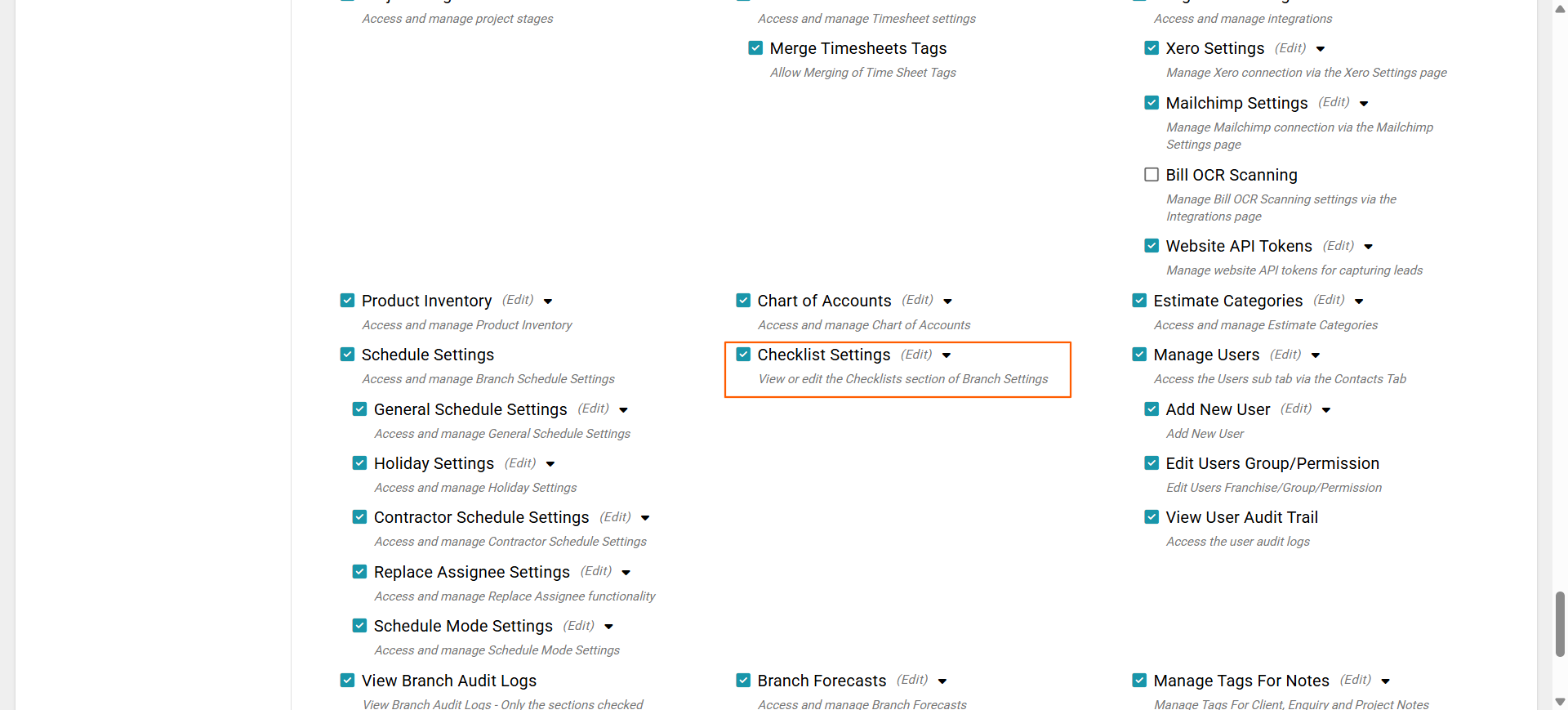
Users who need to manage Checklist Status Groups require the Branch Settings – Checklist Settings permission.
With this permission enabled, users can:
- Add new status group options
- Edit existing status groups
- Merge status groups
- Archive status groups
This permission is separate from the standard project checklist permissions and should only be enabled for users who need to manage checklist settings at a branch level.
Was this article helpful?
That’s Great!
Thank you for your feedback
Sorry! We couldn't be helpful
Thank you for your feedback
Feedback sent
We appreciate your effort and will try to fix the article