Chart of Account Codes (Account Codes)
Xero requires a Chart of Accounts code to be selected on all documents before they can be approved. To help reduce the number of issues users were having when documents reached Xero and could not be saved, Rave made the decision to make account codes mandatory in our system.
This requirement has now been removed (25/02/26)
You no longer need to enter a Chart of Accounts code in Rave, as the mandatory setting has been turned off.
If you load a quote and select a Chart of Account code it will still copy over to the Purchase Order or Bill like it did previously.
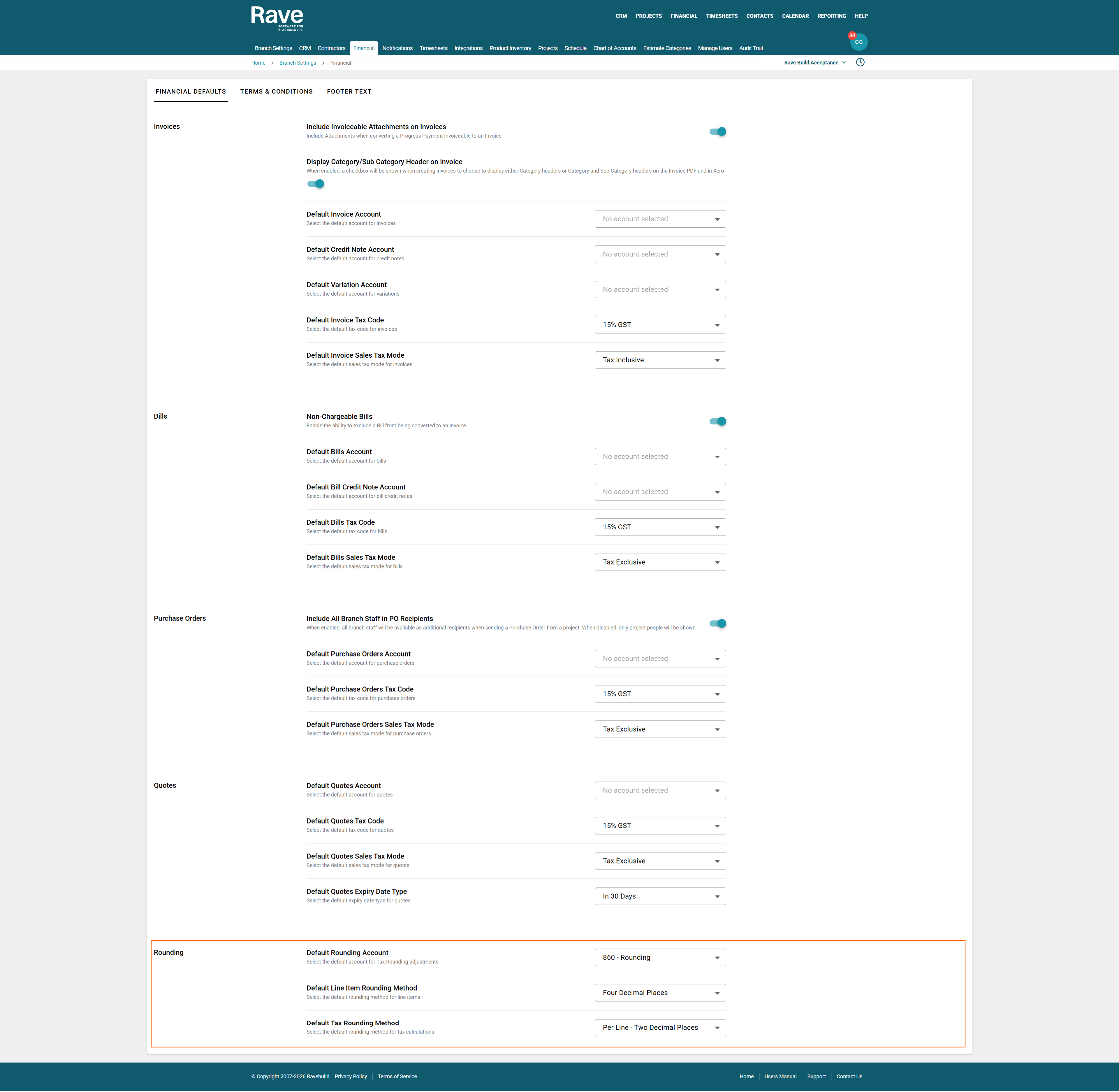
If you would still like codes to be applied automatically, you can set branch-level defaults so the branch code is picked up and saved for you each time.
To do this:
- Go to your Profile dropdown
- Select Financial
- Choose the default code you want to use
If you already have default codes set and want to remove them, you can simply deselect them.
The only defaults you need to keep set are the bottom three rounding codes.
Was this article helpful?
That’s Great!
Thank you for your feedback
Sorry! We couldn't be helpful
Thank you for your feedback
Feedback sent
We appreciate your effort and will try to fix the article