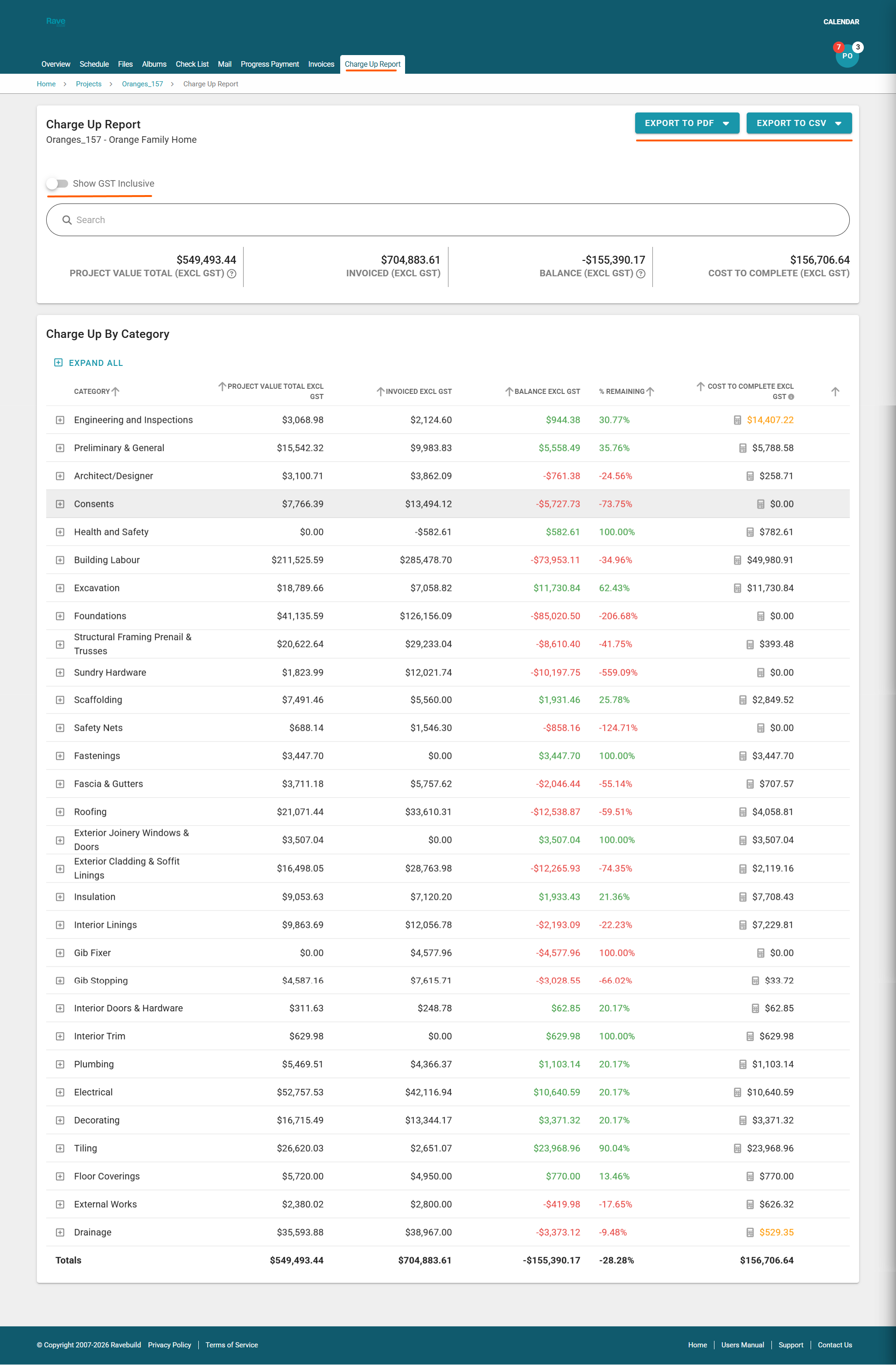
Your Building Partner may provide you with access to the Charge-Up Report tab. This page compares your estimate or charge-up quote against the invoices issued for your project.
At the top of the page, you will see a summary that includes:
- Total Project Value
- Invoiced to Date
- Balance Remaining
- Cost to Complete
The table below is organised by category and, where applicable, subcategory.
It provides a clear breakdown of:
- What has been estimated and is therefore expected to be invoiced
- What has already been invoiced
- The remaining balance to be invoiced
- The current cost to complete
The report can be exported as a PDF or CSV file, with the option to include or exclude notes.
By default, all figures on this page are shown excluding GST. You can change this at any time using the “Show GST Inclusive” toggle.
Note: if you see a calculator icon beside the cost to complete total, you can hover over it to see if it's a category total or the sum of all subcategory items
Was this article helpful?
That’s Great!
Thank you for your feedback
Sorry! We couldn't be helpful
Thank you for your feedback
Feedback sent
We appreciate your effort and will try to fix the article