RAVE’s Financial Management system is designed to help you manage every financial aspect of your projects, including budgets, bills, and invoices, all in one place.
The Bills In sub-tab is where you add and manage supplier and contractor invoices for your projects. In RAVE, these invoices are referred to as Bills.
If you have an active Xero integration, there may be occasions where a Bill or Credit Note in RAVE does not reflect the latest information from Xero, or changes made in RAVE have not synced correctly. To help resolve these situations, we have introduced a new Refresh from Xero feature.
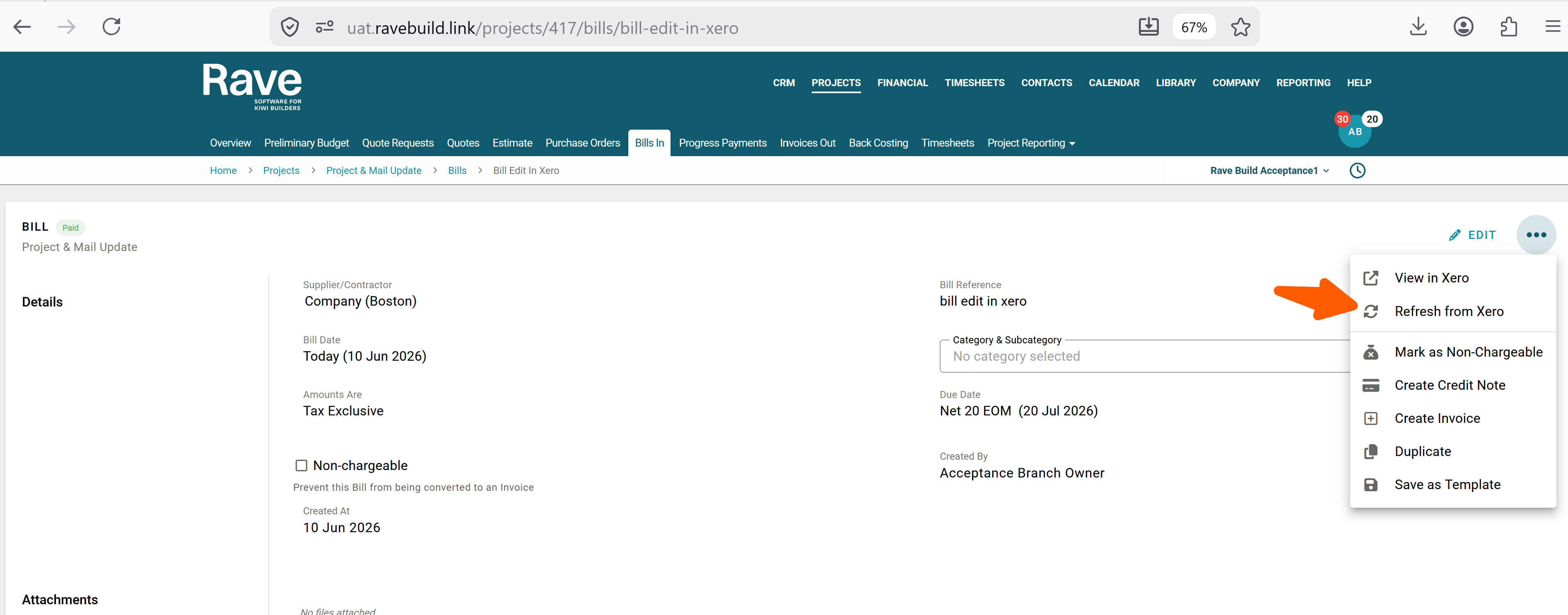
A new Refresh from Xero option is now available from the ... menu on both Bill and Invoice detail pages.
This feature allows you to re-sync a Bill or Invoice with Xero, helping to resolve cases where data has not synced correctly or an error occurred during the original sync process. Simply select the Bill and click the 3 dot elipses and push Refresh from Xero to retrieve the latest information from Xero and update the document in RAVE.
Was this article helpful?
That’s Great!
Thank you for your feedback
Sorry! We couldn't be helpful
Thank you for your feedback
Feedback sent
We appreciate your effort and will try to fix the article