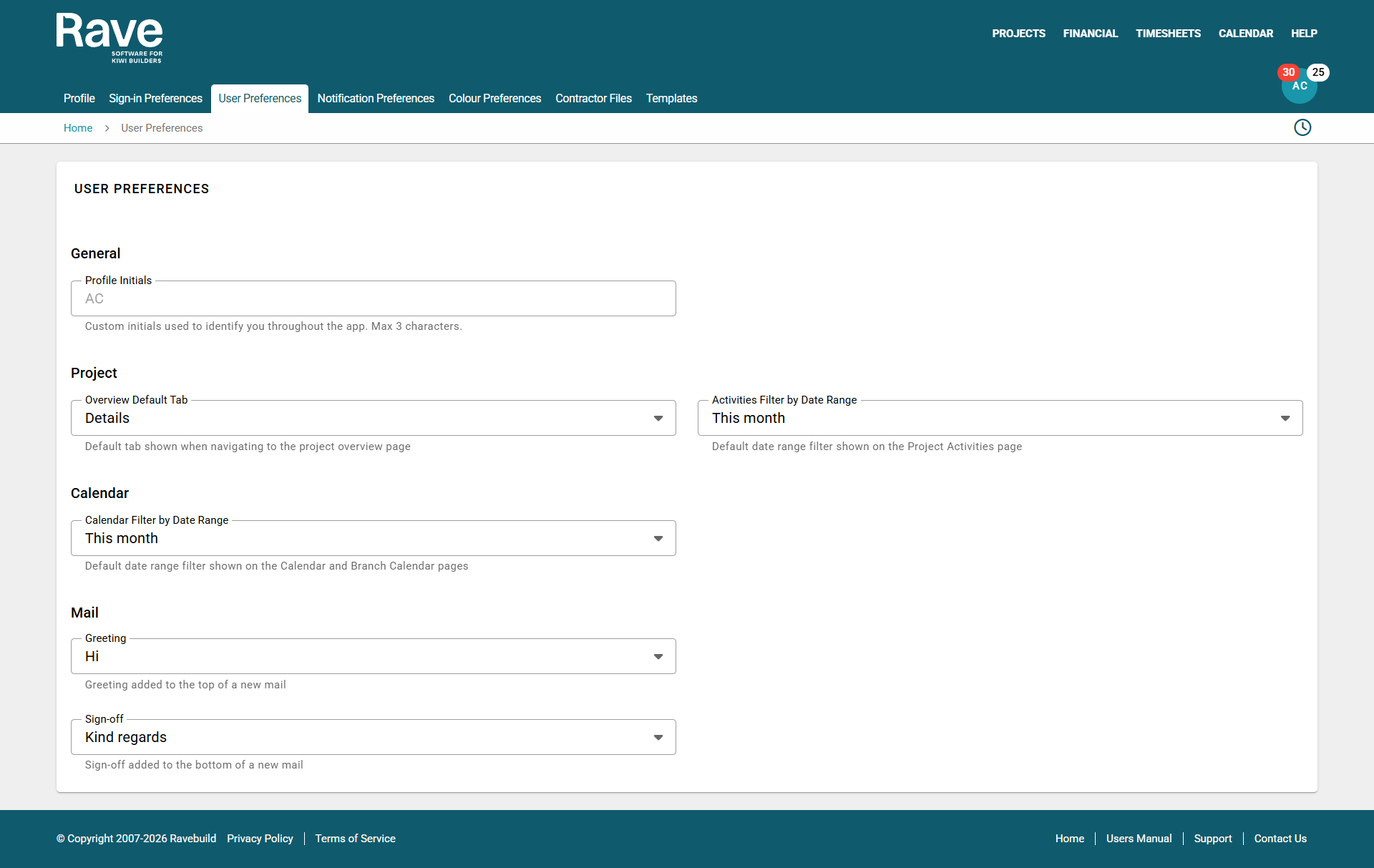
From your profile drop-down (top right-hand corner of the page), select Profile Settings and then User Preferences
Profile Initials
Rave automatically creates your CRM initials using the first and last name in your profile.
In some cases, your initials may be the same as another salesperson’s, which can cause confusion. You can now customise the initials used in the CRM salesperson sections.
This will also update the initials shown in your profile circle at the top right of your screen.
Project Tab Default.
Users can choose which section of the Project Overview opens first when clicking on a project link.
Either Overview, Project Notes, Client Project Notes or Activities. Clicking on this Project icon below anywhere in Rave will bring up the default overview view that you selected above.
Activities Filter by Date Range (CRM)
Select the default date range you wish your CRM Activities page to show. I.E this month, this week etc.
Calendar
Select the default date range you wish your Rave My Calendar to show, and if you have permission to view the Branch calendar. I.e this month, this week etc.
Custom Greeting
When sending a new mail, you can set your default custom Greeting and Sign-off. Pick from our pre-populated choices or enter your own custom greeting/sign off.
Was this article helpful?
That’s Great!
Thank you for your feedback
Sorry! We couldn't be helpful
Thank you for your feedback
Feedback sent
We appreciate your effort and will try to fix the article