Branch Level Financial Notes Export

Modified on Tue, 26 May at 7:44 AM

Within Rave's Financial Management System, you can add notes to Quotes, Purchase Orders, Bills, and Credit Notes

These notes are a useful way to keep track of important financial information and decisions across your projects.

Common uses for notes include:

  • Recording reasons for discounts given
  • Tracking price changes
  • Monitoring overspends or unexpected costs
  • Adding internal reminders or financial context

Exporting Notes with Branch CSV Export


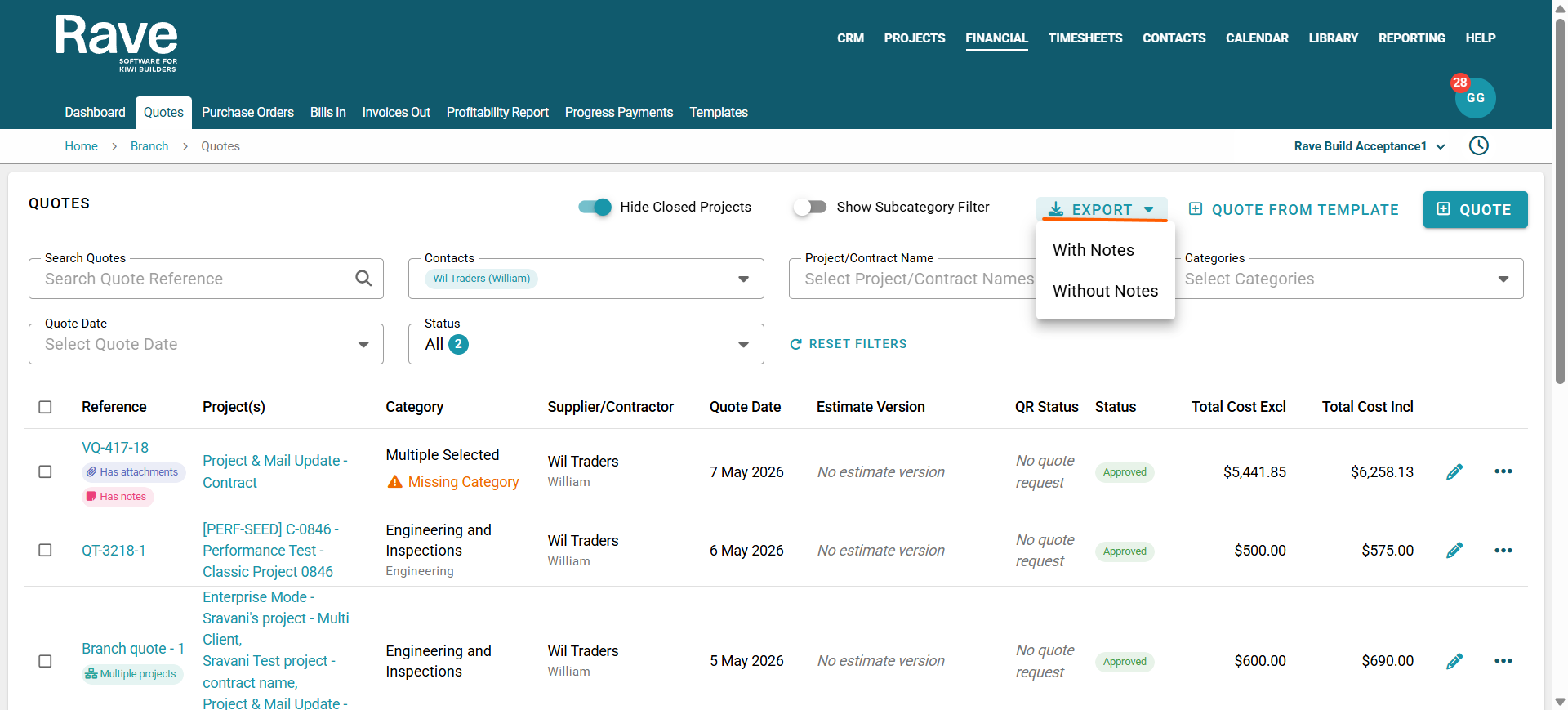
Navigate to the Financial Tab at the top of the screen. 

Choose the correct Branch level document type:

  • Quotes
  • Purchase Orders
  • Bills
  • Invoices

Before exporting, you can use the available page filters to narrow down your results

Filters include:

  • Supplier or recipient
  • Category
  • Subcategory
  • Additional document filtering options

These filters make it easier to find and export the exact financial records you need for reporting, auditing, or project tracking.


When exporting, you can choose whether to:

  • Include notes in the export
  • Export documents without notes

If a document contains multiple notes, all notes will be included in the CSV export in date order, with the most recent note displayed first.


Was this article helpful?

That’s Great!

Thank you for your feedback

Sorry! We couldn't be helpful

Thank you for your feedback

Let us know how can we improve this article!

Select at least one of the reasons
CAPTCHA verification is required.

Feedback sent

We appreciate your effort and will try to fix the article