Setting Up Custom Enquiry and Project References
Rave lets you automatically create a new Enquiry or Project and replace the default enquiry or project reference with your customised project numbering system. You can also choose to update the enquiry reference to match a newly created project reference.
This is useful if your business uses a consistent job numbering format such as SR100 rather than Rave’s standard project reference.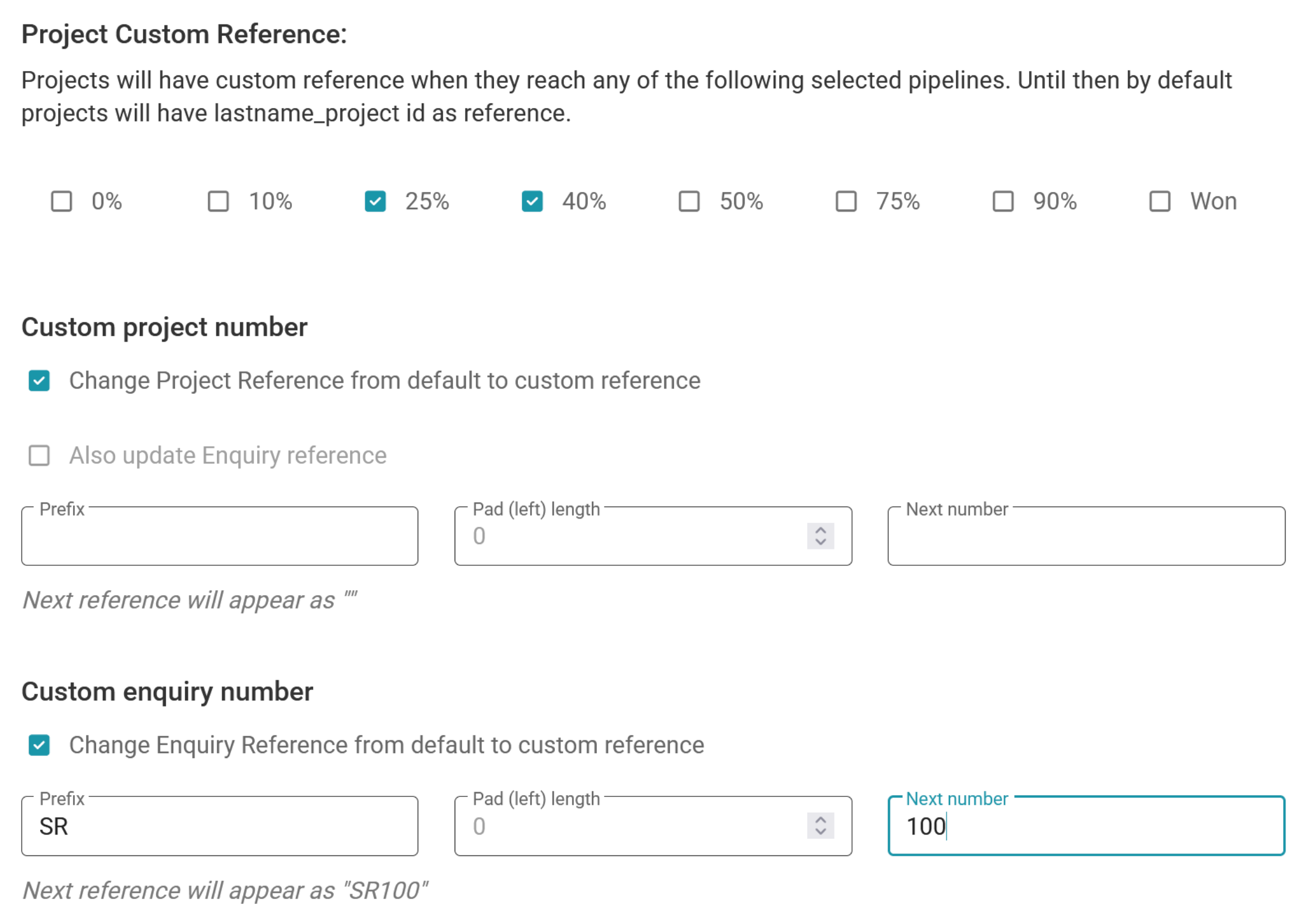
How custom enquiry references work
You can create your own enquiry reference when setting up an enquiry. But, if you choose not to do so, Rave will create a default enquiry reference using the format ENQ-your branch prefix-a sequential number. For example: ENQ-SR-100
How custom project references work
By default, a project will be created with a project reference based on the client's last name_project ID. For example: smith_12345
Using the Project Custom Reference settings, you can choose when Rave should replace this default reference with your custom project number.
Select when the custom reference is applied
Once the enquiry pipeline reaches or exceeds any nominated stages (0%, 10%, 25%, 40%, 50%, 75%, 90% or Won), Rave will create a new project for you with the custom reference using the next available custom project number.
Setting up your custom project number
One of our Rave Customer Support team must enable this feature, as branches can't change it on their end. Please email help@ravebuild.co.nz and provide our team with the information we need to enable this:
- Which pipeline stages do you wish to start the auto project creation and reference trigger from?
- Do you want to change the Project Reference from default to a custom reference?
- And, do you want to also update the enquiry reference to match?
The Configuration we use is:
Prefix
Enter any letters or characters you want to appear before the project number.
For example: RBA
Pad (left) length
This controls the minimum number of digits used for the numerical portion of the reference.
For example, if the Pad Length is 3:
- 1 would display as 001
- 25 would display as 025
- 125 would display as 125
Numbers longer than the selected pad length will not be shortened.
Next number
Enter the next number you want Rave to use when generating a custom project reference.
For example, with:
Prefix: RBA
Pad Length: 3
Next Number: 25187
The next project reference will be:
RBA25187
If you would like to always have a project created every time a new lead comes in, you would request Rave to set it up from 0% so that you can create a new project using the + Project button, and that lead would automatically be created for you, with the enquiry and project numbering triggered.
If you would only like a project created and reference to kick in from 25% onwards you would select 25% all the way to won.
Was this article helpful?
That’s Great!
Thank you for your feedback
Sorry! We couldn't be helpful
Thank you for your feedback
Feedback sent
We appreciate your effort and will try to fix the article