You can access your Project’s financial workflows from either the Financial button or the Project button's Project list, clicking on the project’s reference number, and finally selecting the Progress Payments Subtab.
The majority of RAVE's building clients will have a signed contract, with some form of PC Sum (Prime Cost) or Provisional Sums included within it. Rave provides a lot of flexibility on how you can manage your project's Provisional and PC Sums via the project's Progress Payment (Payment Schedule) sub-tab.
Provisional sum v's PC Sum
Firstly, we will go into the difference between Provisional Sums and PC Sums; the difference isn't just the terminology, they both have different legal implications.
Provisional Sum
Definition:
A Provisional Sum is an estimate for both supply and labour for a part of the work that cannot be clearly defined at the time of the contract.
Used for work where the scope is uncertain (e.g., siteworks, landscaping, drainage).
Once the work is better defined, the actual cost replaces the provisional sum.
Legal Implication:
The contractor must prove actual cost of the work (labour + materials) to claim payment.
If the final cost is higher or lower than the provisional sum, the contract price is adjusted accordingly.
The contractor often takes on less risk for this portion of work, since it’s treated as an estimate.
PC Sum
Definition:
A PC Sum is an allowance in the contract for the supply (only) of specific items that are not yet selected at the time of contract signing. These are typically fixtures and fittings (like taps, tiles, appliances).
The cost includes supply only, not installation.
Contractor is to provide for installation cost separately.
The client will choose the actual item later, and if it costs more or less than the PC sum, the contract price is adjusted.
Legal Implication:
It's a fixed allowance for materials to be selected by the owner.
The builder has no legal obligation to install more than what the PC sum covers unless a variation is agreed upon.
Adjustments are made based on actual supplier invoice, not estimates.
How do we account for these in Rave?
For easy visibility and clarity, the majority of Rave clients will add a Provisional Sum as an invoiceable line within the 'Other' payment section and the PC Sum usually in the Variations Tab by either requesting part payments as they go, or leaving it as a pending payment to invoice out when that portion of the project is complete
On the other hand, a few clients may want to include their PC Sum amounts within their Payment Schedule section's invoiceables.
Note: While this third option (hiding the PC Sum or Provisional Sum within a payment schedule line) is possible within Rave, it is not recommended as best practice i.e. the Sum is not clearly visible to the client (or staff), it is hard to see what has been charged, and what payments have been received for the Sum portion within that payment schedule line.
For Clarity a Provisional Sum relates to Labour and Materials and a PC Sum relates to Materials Only.
i.e. A typical Provisional Sum could be Excavation, Drainage or Kitchen. A typical PC Sum could be tiling supply at say $55 inc. GST m2. So, Materials only, no labour component.
Usually, PC sums can be dealt with as a variation. Provisional sums are dealt with in our 'other tab'
We're going to go through each option below, starting with adding each Provisional Sum as an invoiceable line.
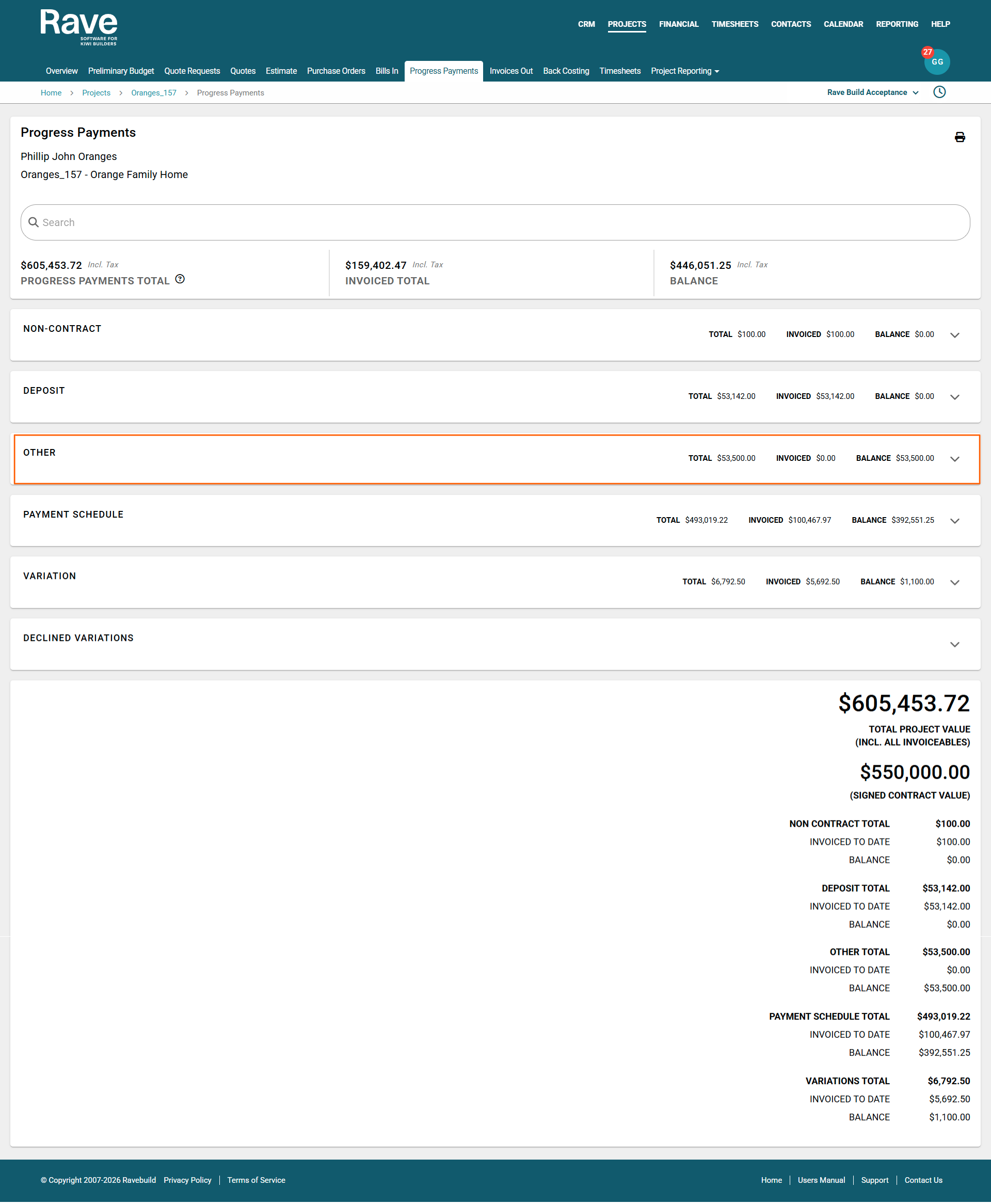
1. Adding a Provisional Sum as an Invoiceable Line - Charging Out as you go
To add a Provisional Sum that you plan to charge out as you go, you firstly need to key these Sums as Invoiceable lines in the 'Other' payment section before loading your Progress Payments if these Sums are to be invoiced separately from your Progress Claims
- We open the project, click on the Progress Payment sub-tab, and move down to the 'Other' payment section
- We then add the Provisional Sum line as an invoiceable via the 'Add an Invoiceable' button
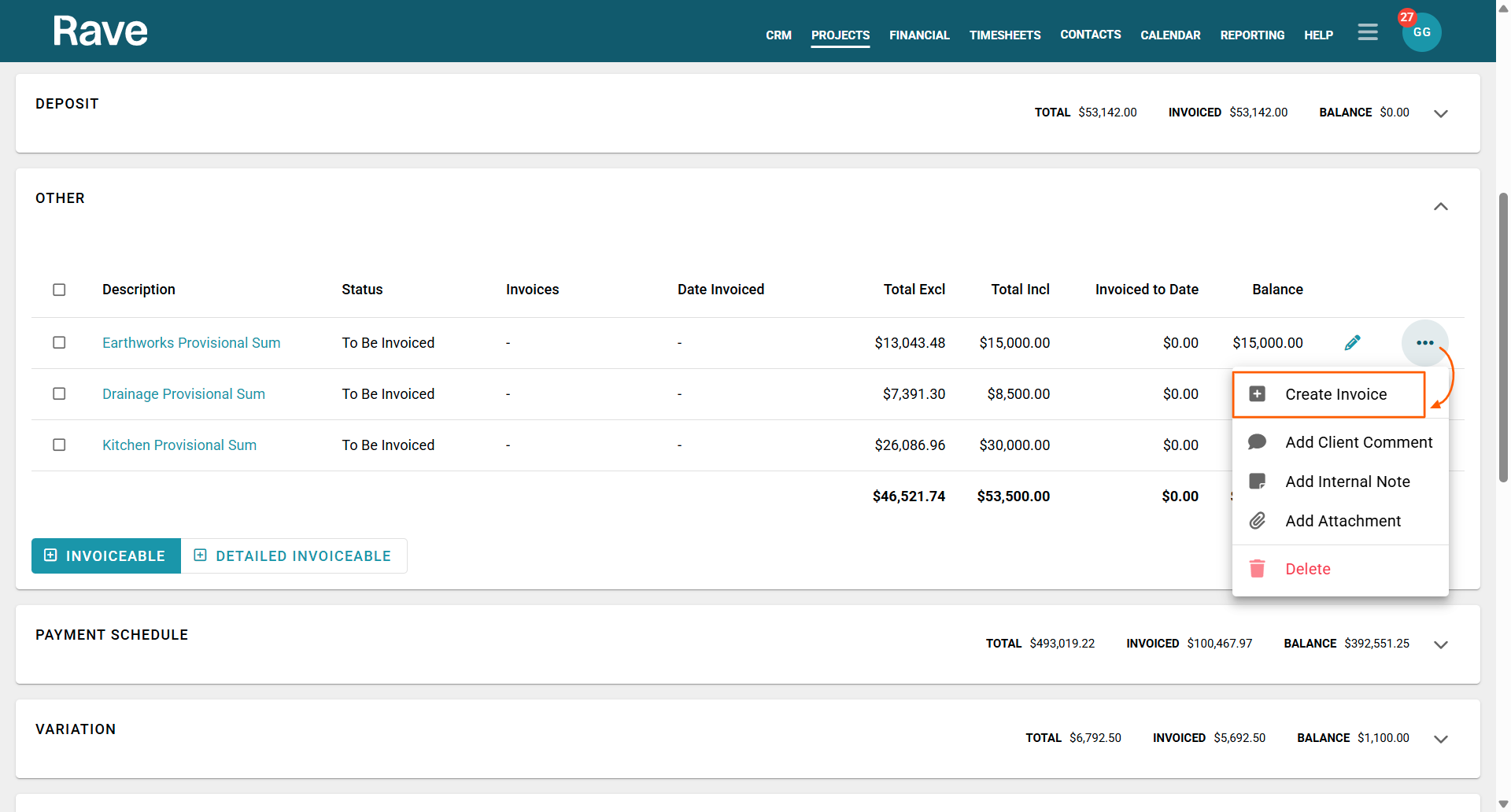
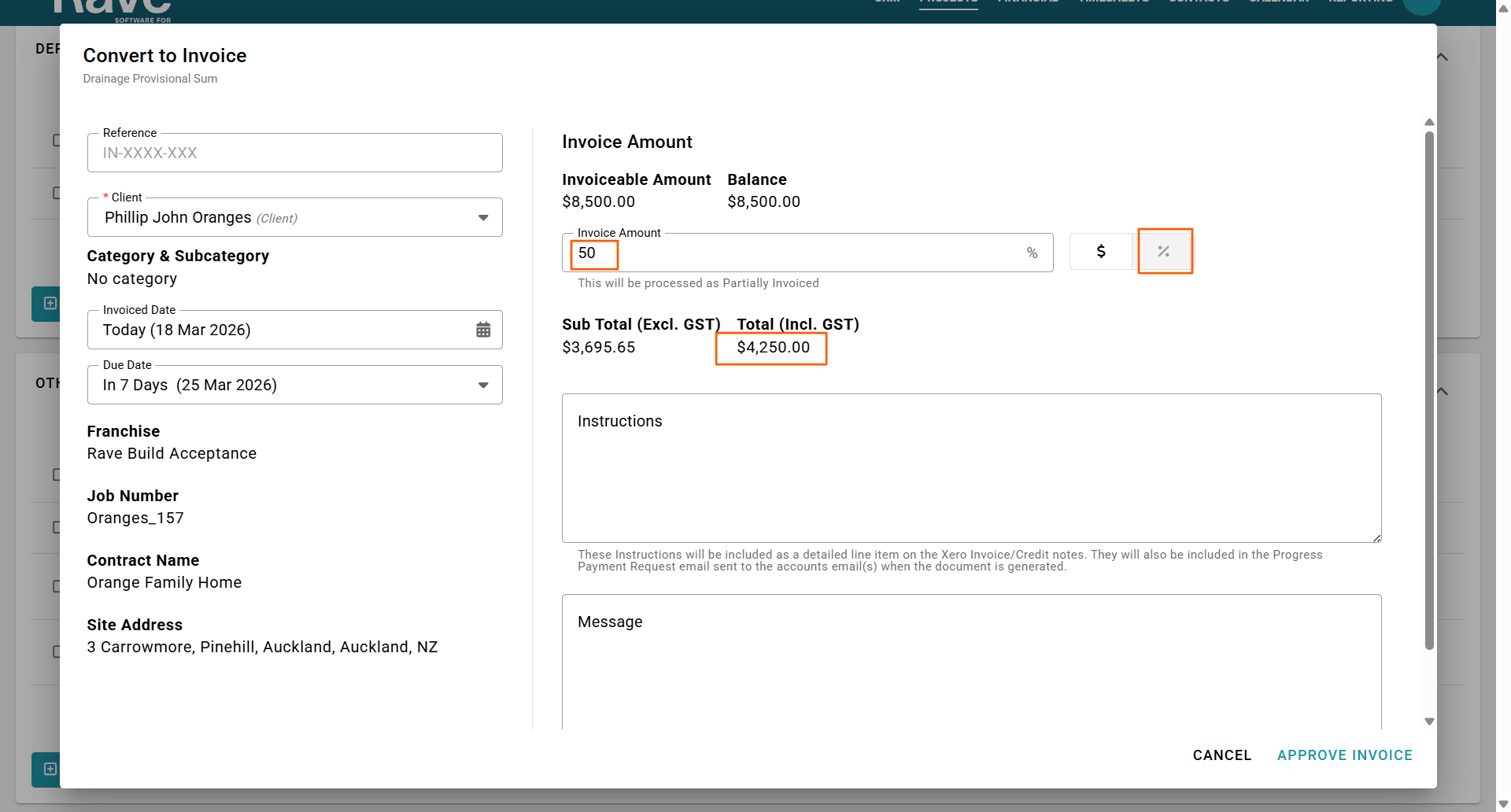
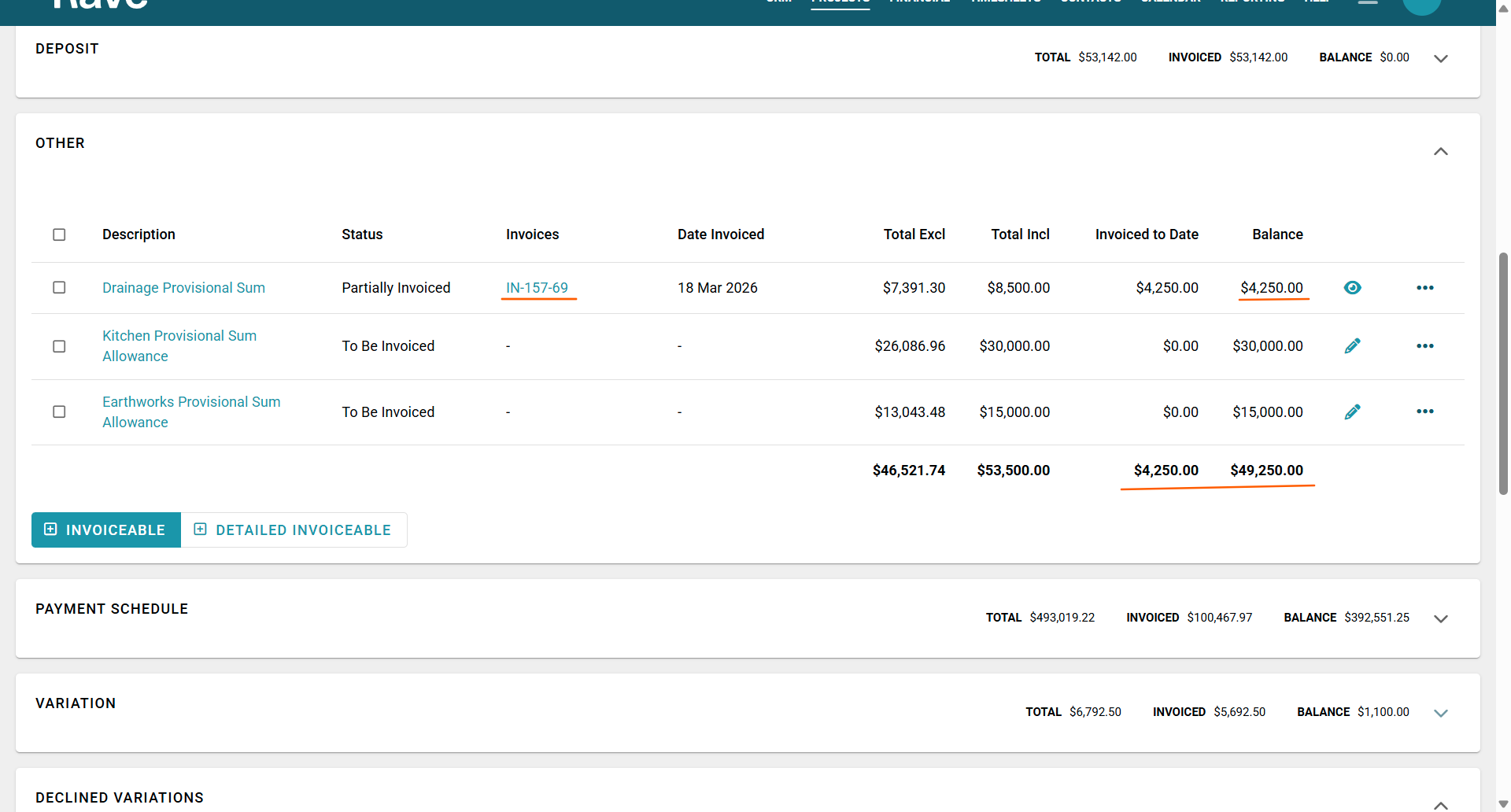
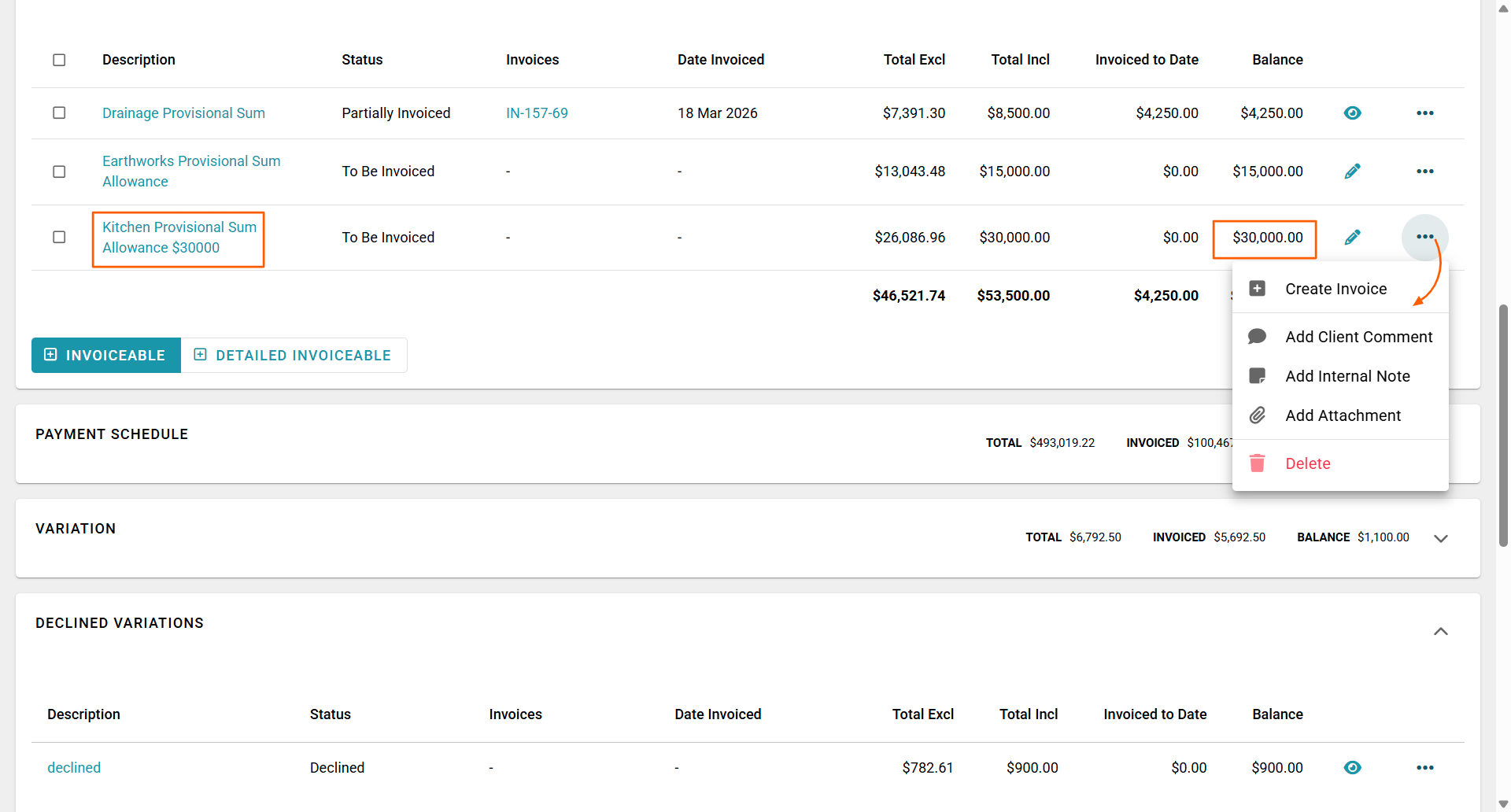
The process of adding an invoiceable, and adding notes, comments, and attachments is covered by our How to Add, Request Payment, and Receive Payment on a Basic Invoiceable and How to Add and Edit Detailed Invoiceables articles. - Once loaded as an invoiceable, you can create this invoice, and request payment for the full amount, or charge as you go with a partial payment request (say 25% etc.)
The process of requesting a payment is covered by our How to Convert an Invoiceable to an Invoice i.e. Request a Payment and How to Add a Payment to an Invoice - via the Invoices Out sub-tab FAQs.
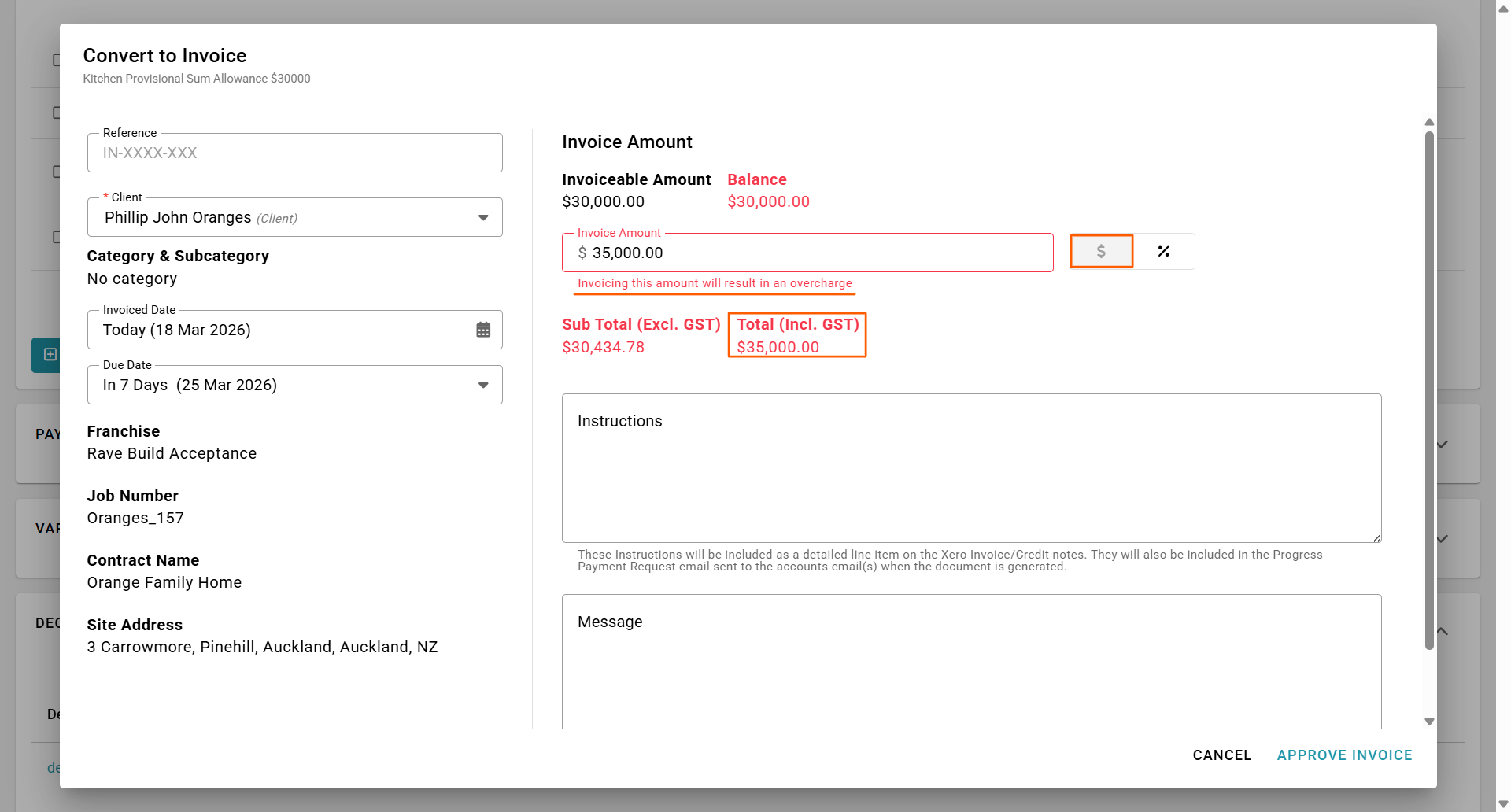
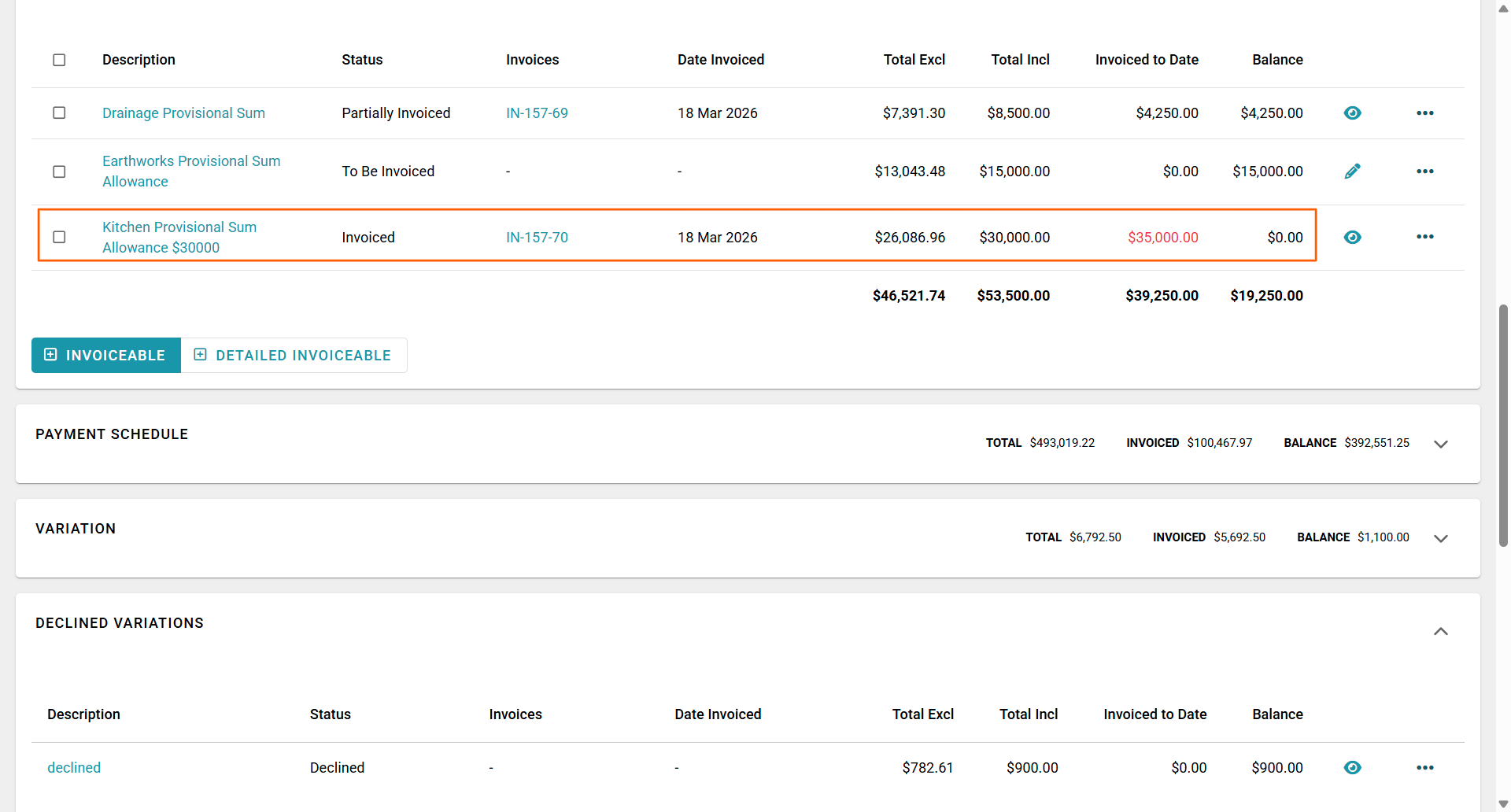
NOTE: A cool feature of the 'Create Invoice' function is that the Invoiceable amount will default to the full remaining amount to be paid and set the 'Invoice Amount' $ or % accordingly. Eventually, you may go over the originally Provisional Sum amount, this will display as 'Overcharge' showing the original balance to be claimed, and the new amount. Approving an overcharge - will display the 'Invoiced to Date' amount in red - clearly showing an overcharge vs the original total.
2. Adding a Provisional Sum as an Invoiceable Line - Charging on Completion of that Stage
To add a Provisional Sum that you plan to charge out on completion of that portion of the project, you again need to add your Provisional Sums as Invoiceable lines in the 'Other' payment section:
- By opening the project, clicking on the Progress Payment sub-tab, and moving down to the 'Other' payment section
- We then add the PC Sum line as an invoiceable via the 'Add an Invoiceable' button
The process of adding an invoiceable, and adding notes, comments, and attachments is covered by our How to Add, Request Payment, and Receive Payment on a Basic Invoiceable and How to Add and Edit Detailed Invoiceables FAQs. - Once loaded as an invoiceable, you can leave this as a pending invoiceable - and just keep editing the amount (or adding additional invoiceable lines), until all amounts have been added in. At that point, you can convert this to an invoice, and request payment for the full amount due.
The process of requesting a payment is covered by our How to Convert an Invoiceable to an Invoice i.e. Request a Payment and How to Add a Payment to an Invoice - via the Invoices Out sub-tab FAQs.
TIP: While the Pprovisional Sum is in a pending state you can Edit the description, to add the original expected value of the Provisional Sum to the end of the description i.e. '...ALLOWED $30,000' - so that the progress payment page show's the client we've allowed for $30,000, but the final result is a bill of $35,000
3. Loading your Provisional Sum Amounts Within your Payment Schedule
Loading your Provisional Sums & PC Sums within your Payment Schedule is possible with Rave - but not recommended i.e. it is not easy for the client (or staff) to see what is being charged, and what payments have been received for the Provisional Sum or PC Sum portion of that payment schedule item.
However, for building companies who opt to list their Provisional and PC Sums in this way, we still add the Provisional Sum as a line item to the Other Tab however the main thing to note is that we need to credit the allowance and bill the actual.
The Process is the same as above however we credit the Provisional Sum allowance and bill the actual.
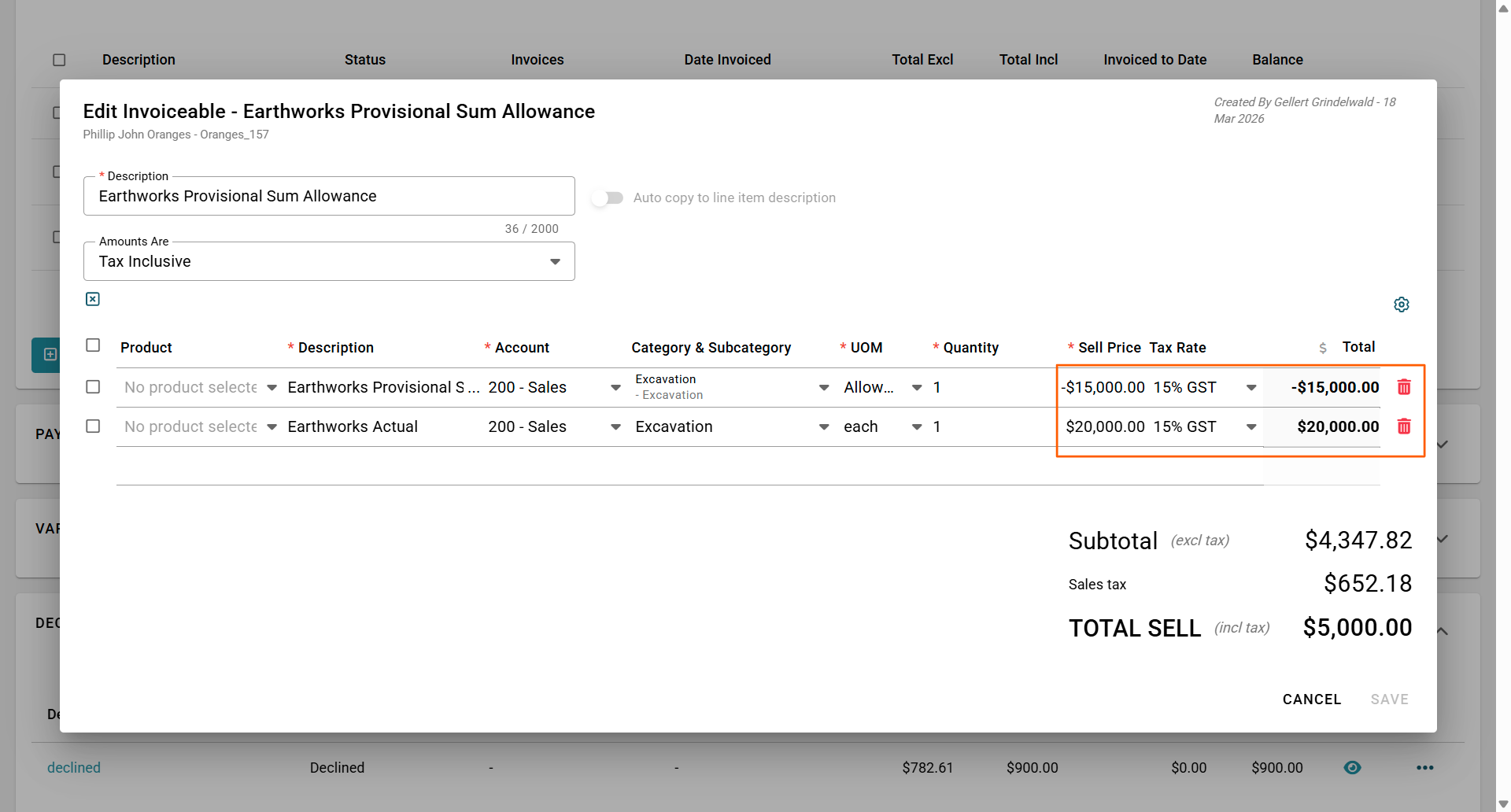
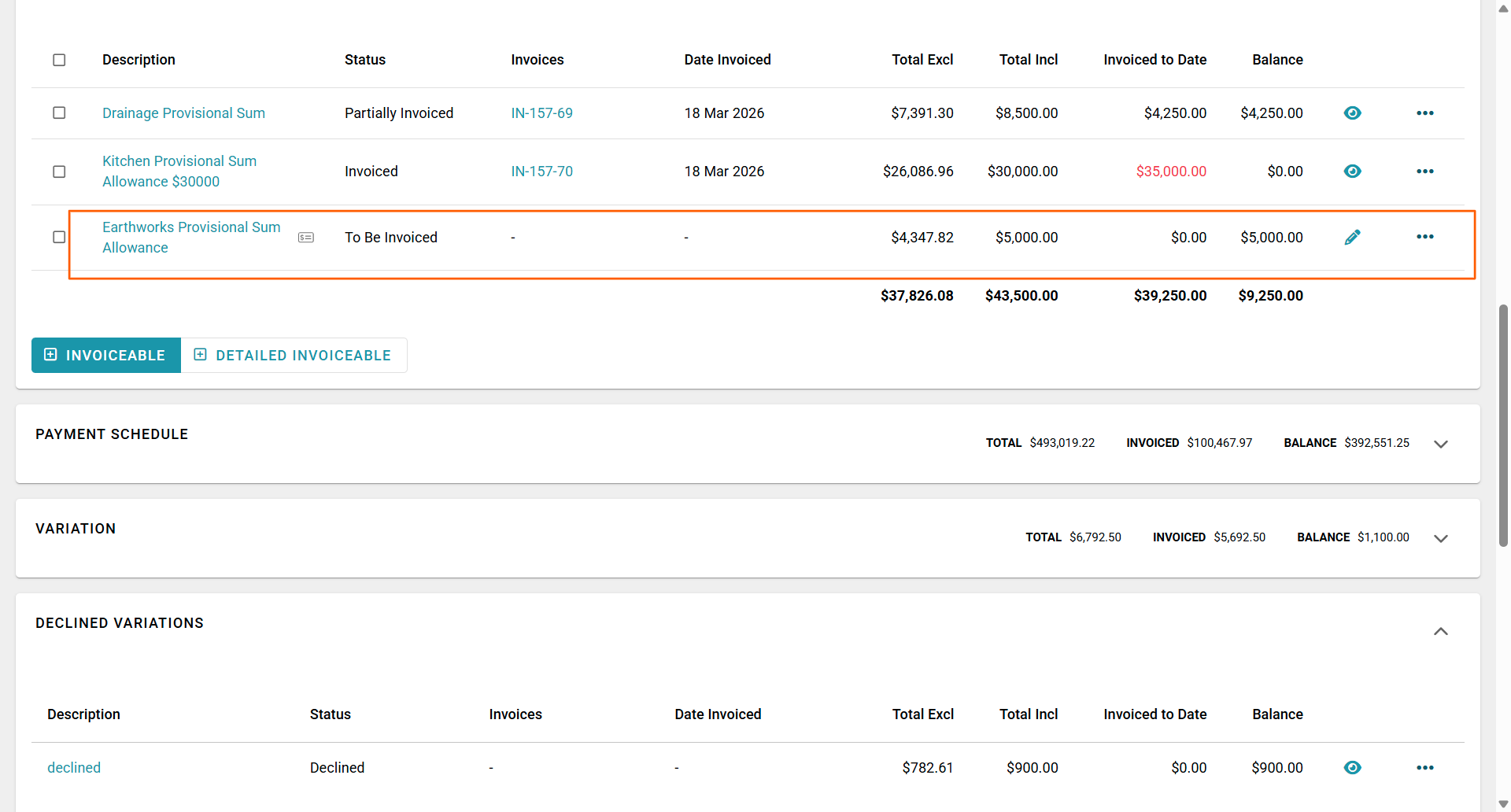
You can now convert the $5000 extra to an invoice, while invoicing your progress claims that has the original allowance of $15,000 included in the staged claim.
The process of requesting a payment is covered by our How to Convert an Invoiceable to an Invoice i.e. Request a Payment and How to Add a Payment to an Invoice - via the Invoices Out sub-tab FAQs.
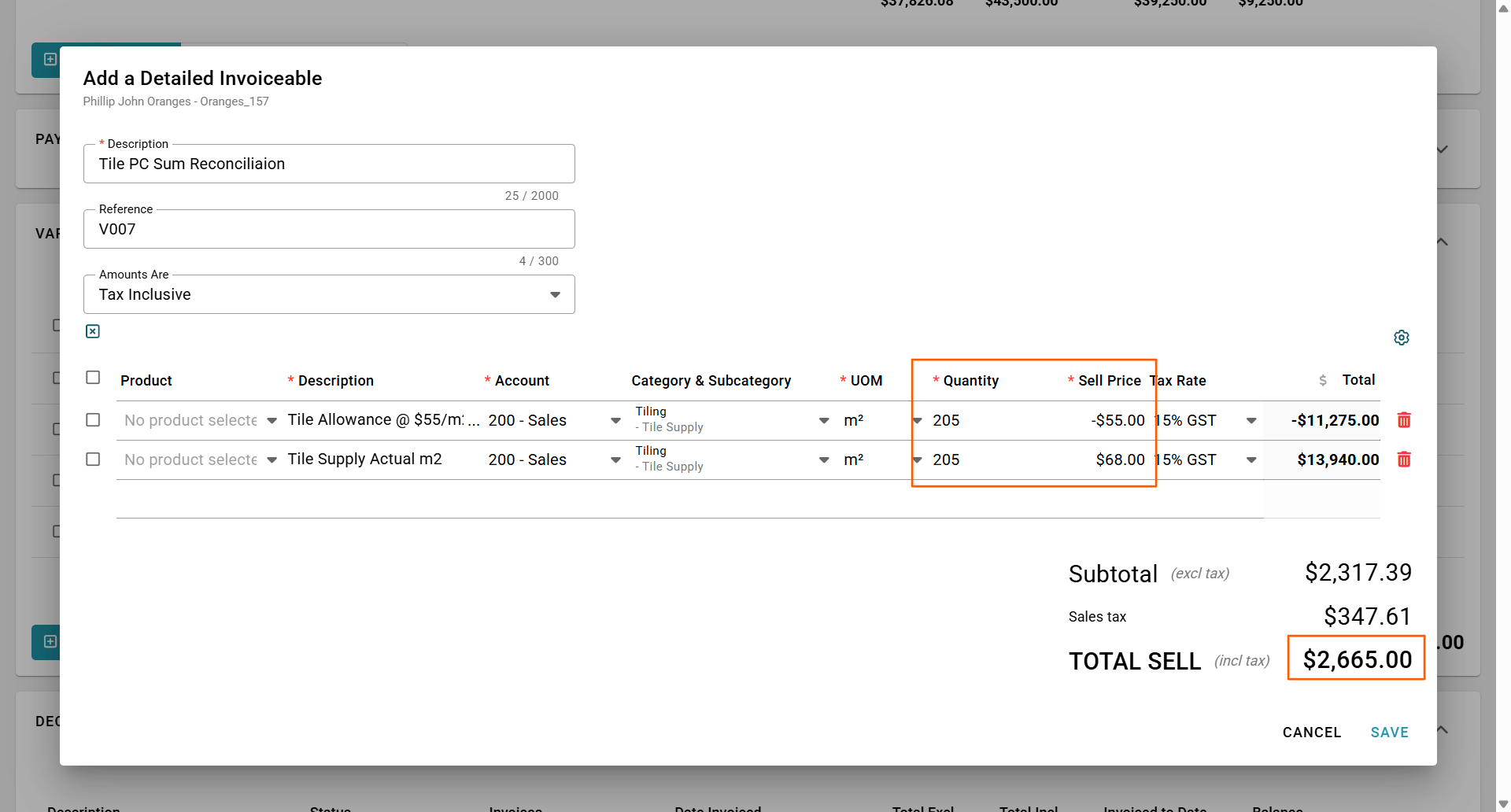
To account for a PC Sum - i:e tile supply allowance it is best to do this in our Variations Tab.
Create a Variation crediting the m2 allowance in the contract for the PC sum allowance and billing the new m2 actual Tile price. This way your client can see the credit for the contract allowance and the debit for the actual tile chosen.
Was this article helpful?
That’s Great!
Thank you for your feedback
Sorry! We couldn't be helpful
Thank you for your feedback
Feedback sent
We appreciate your effort and will try to fix the article